top of page

UCFILESPACE UPDATE

I redesigned UCFilespace to make it more user-friendly, and eliminate existing design problems. The design constraints were that we can only use typography, single clicks (no scrolling, roll overs, drag and drops, or right clicks were allowed), as well as no animation. The end result was then made into an interactive prototype to complete the tasks below.
-
Login. (Skip for initial test. Start on My Account page.)
-
Move the folder named “project_1” out of “Sites” and into “Documents”.
-
Rename it “project_1_backup”.
-
Move the file “w1c1.pdf ” out of “Documents” and into the “Sites” folder.
-
In the “Sites” folder, delete the folder “test_site”.
-
Logout.
To try out the prototype, click here.
Original UCFilespace Design

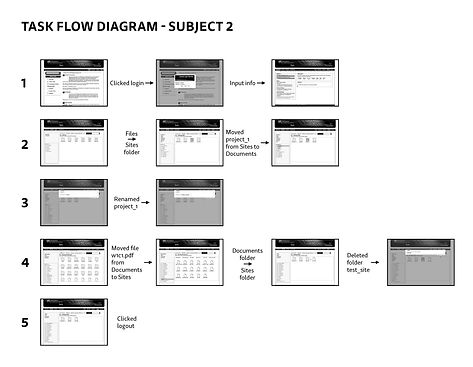

Final Redesigned Taskflow Wireframes
bottom of page